TypeSafe's Jev is a model that doesn't write. Here's why that matters.
TypeSafe AI opened early access to Jev, a decision model that returns probabilities instead of text, in September 2026. Research on inference energy suggests models like this could cut the cost of a lot of everyday automation.
On 15 September 2026, TypeSafe AI opened early access to Jev, the first in a line of what it calls “System One” models. The name borrows from Daniel Kahneman's split between fast, intuitive thinking and slow, deliberate reasoning. Jev is built for the fast kind: quick judgments that don't need an essay.
That matters because of what most AI workflows actually do. Look at almost any of them and most of the steps aren't writing at all. Is this email a complaint? Which team should this ticket go to? Does this invoice match the purchase order? Is this lead worth a reply? They're decisions. But the usual way to build them is to ask a large language model, let it write out an answer, and then parse that text back into something the code can use.
It works. It's also a lot of machinery for a yes or no. The model generates tokens nobody needed, the answer sometimes comes back in the wrong format, and every one of those tokens costs money and electricity.
What Jev does differently
Jev doesn't generate text at all. You give it some context (an email, a ticket, a few fields from a form) plus a set of typed questions, and it gives you back probabilities:
- Yes or no, with how confident it is.
- Which of these options, with a probability for each one.
- A score along a range you define.
It reads the context once and answers every question against it in parallel, so ten questions about one support ticket cost about the same as one. The answers come back already typed. Nothing to parse, and nothing breaks when a model gets creative with its formatting.
The simplest way to think about it: it's a prediction model, not a generative one. A chatbot predicts the next word. Jev predicts how likely an outcome is. And unlike the classifiers businesses used to build, it doesn't need thousands of labeled examples first. You describe the options when you ask, and it works straight away.
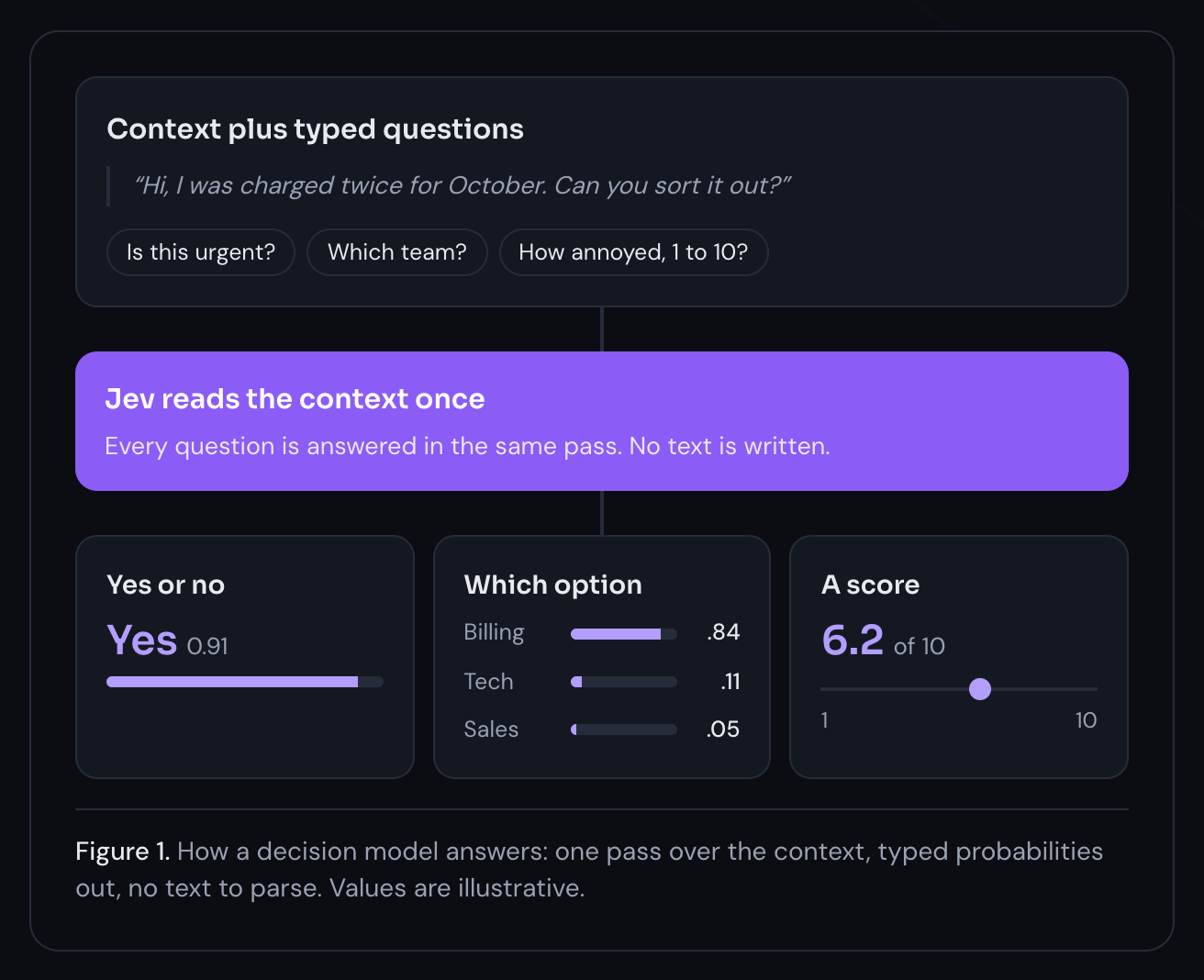
Context plus typed questions
“Hi, I was charged twice for October. Can you sort it out?”
Jev reads the context once
Every question is answered in the same pass. No text is written.
Yes or no
Yes 0.91
Which option
A score
6.2 of 10
Why this matters for the climate side of AI
We've written before about where AI's environmental cost actually sits. Mostly it isn't training. It's inference: the same oversized model answering simple questions millions of times a day, and most of that work is generating text, one token at a time.
The scale is growing. The International Energy Agency estimates data centres used about 1.5% of the world's electricity in 2024 and expects that to roughly double by 2030. And the research on where that energy goes points at generation. Luccioni, Jernite and Strubell measured the energy used by dozens of models on common tasks and found that general-purpose generative models used far more energy per task than smaller task-specific ones, often by orders of magnitude, with text generation the most energy-intensive task of all. Classification is exactly the kind of task where they found a purpose-built model did the job for a fraction of the energy.
A decision model skips that part. No output text means no output tokens, and TypeSafe doesn't even charge for output. One pass over the input covers every question. For the classify, route, and check steps that fill so much of a typical workflow, that's far less compute per decision than asking a general-purpose model to talk its way to an answer.
Here's what we know and what we don't. TypeSafe hasn't published energy or carbon figures, and most of the speed and cost claims floating around come from them. But the logic holds: less work per decision means less energy per decision. It's the rule we already build by. Use the smallest tool that reliably does the job.
Where it fits in the workflows we build
Jev doesn't replace language models. It handles one layer of a workflow, and handles it well:
- Triage and routing. Sorting incoming emails, tickets, or form submissions into the right queue before anyone or anything else touches them.
- Gatekeeping the expensive steps. Deciding whether a request needs a large model at all. Only the cases that need real writing or reasoning get passed on, which cuts cost and footprint across the whole workflow, not just one step.
- Guardrails on both sides of a chatbot. Before the language model runs: should the assistant answer this at all? If not, it gets turned away without paying for a model call. After it runs: does the reply give legal or medical advice it shouldn't? Then it gets swapped for a safe response before the customer sees it.
- Quality checks. Does this draft mention the right customer? Does it include a price? Is the tone off? Lots of yes-or-no checks, answered in one fast call, before anything gets sent.
- Scoring structured data. It reads form fields and records, not just free text. A new sign-up or an incoming request can get a priority score the moment it lands, so the right ones get a reply first.
- Human-in-the-loop thresholds. The confidence scores are designed to be calibrated, so you can set a clear rule: above 0.9, go ahead; below 0.7, a person looks at it. That's a far more honest review gate than trusting whatever a chatbot said.
A worked example: an internal AI assistant
Here's how we'd use Jev on a build we see a lot. This is an illustrative example, not a client project, and the percentages are assumptions to show the shape of the saving, not measured results.
Before. A company of a few hundred people has an AI assistant that answers staff questions from its own documents: policies, product specs, runbooks. It can do a few things too, like open a ticket or update a customer record. Every question goes to the biggest model they have, along with the top ten snippets the search pulls back. So an easy question costs as much as a genuinely hard one, and a good chunk of the bill is the big model reading text it never needed.
After. Jev sits at three points in the flow.
1. At the front: routing. Before anything else runs, one Jev call asks three things:
- Can a small model handle this, or does it need the big one?
- Does it need the company's documents at all?
- Should the assistant stay out of it? A personal HR matter, say, or a legal question.
“What's our holiday policy?” goes to the small model. “Compare how these three contracts handle liability” goes to the big one. A complaint about a manager goes to a person. And if Jev isn't sure, the question goes to the big model. Sending an easy question up wastes a few cents. Sending a hard one down gets someone a bad answer. When in doubt, go up.
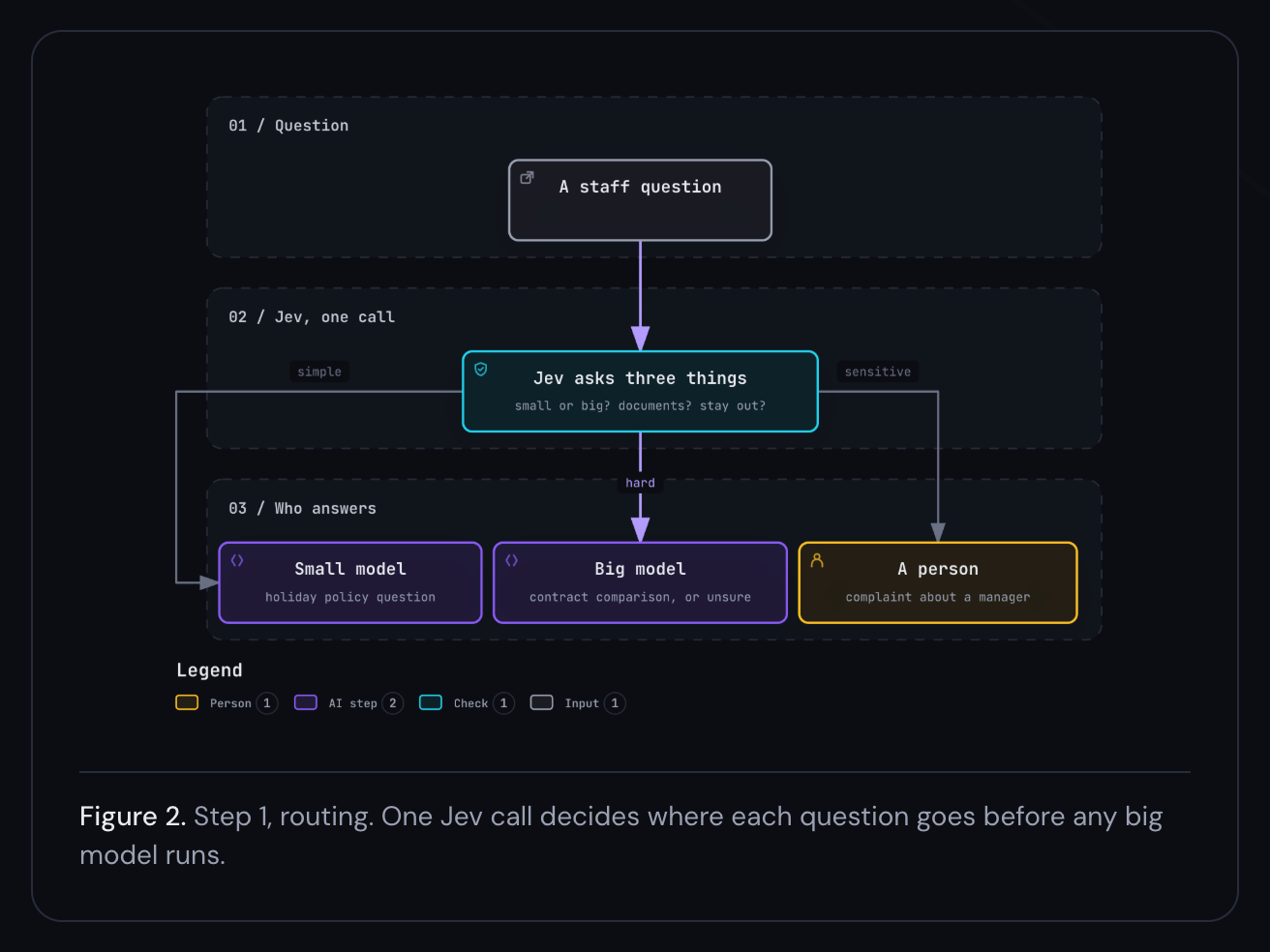
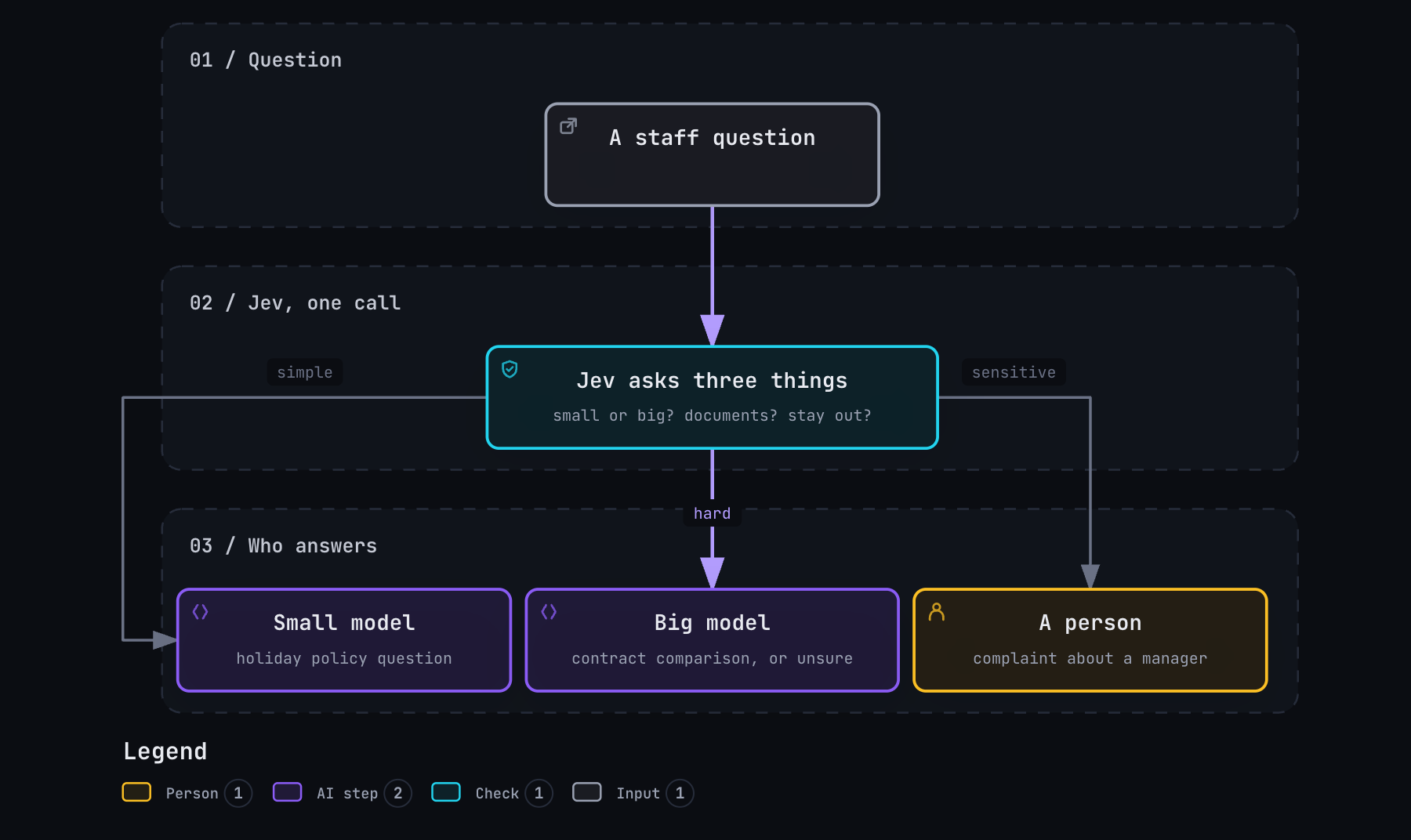
Scroll sideways to see the whole diagram.
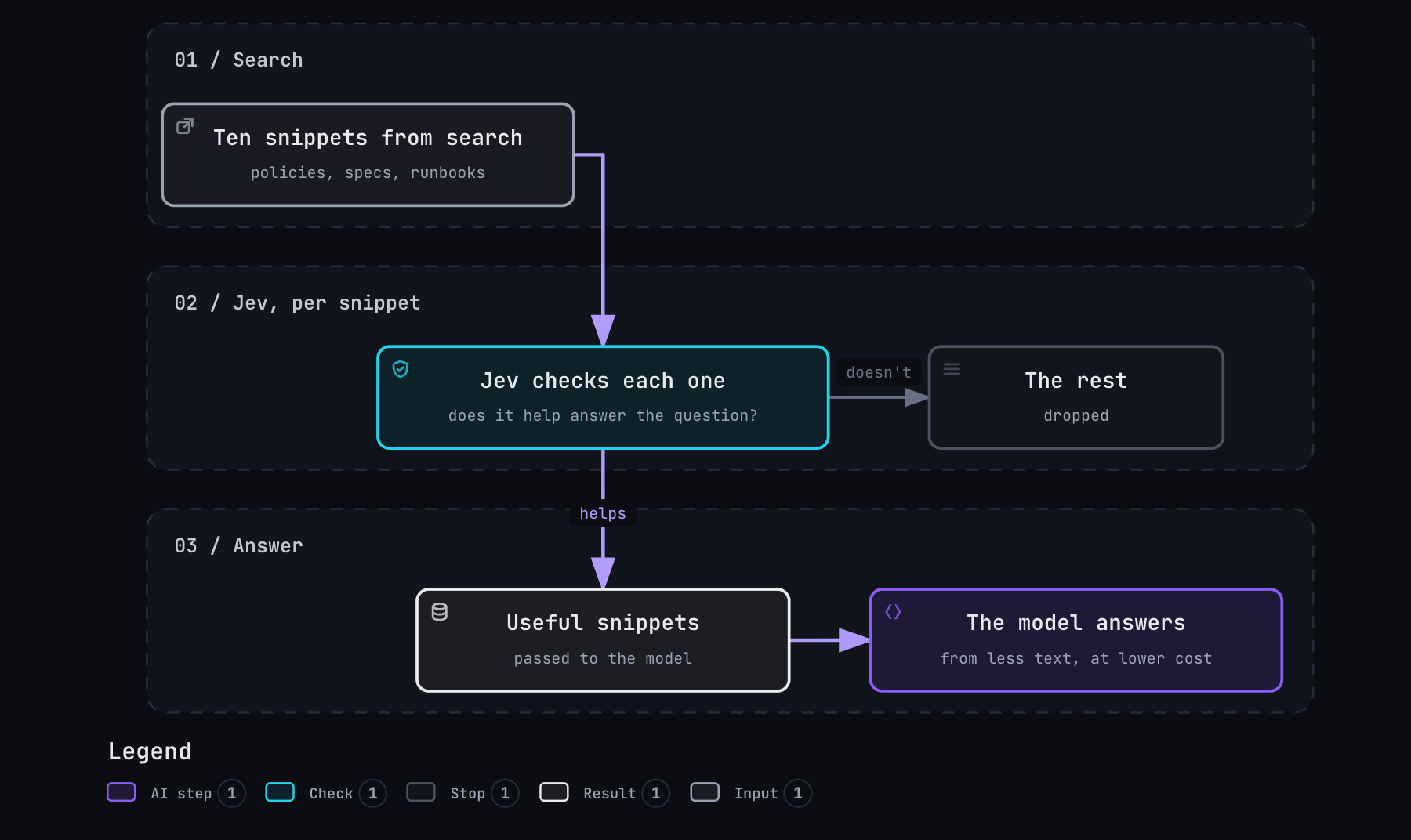
2. In the middle: filtering the documents. Search usually hands back ten snippets and the assistant passes all ten along. Jev checks each one against the question and asks whether it actually helps. Only the useful ones go through. The big model has less to read, so the call is cheaper, and there's less chance of a confident answer built on the wrong page.
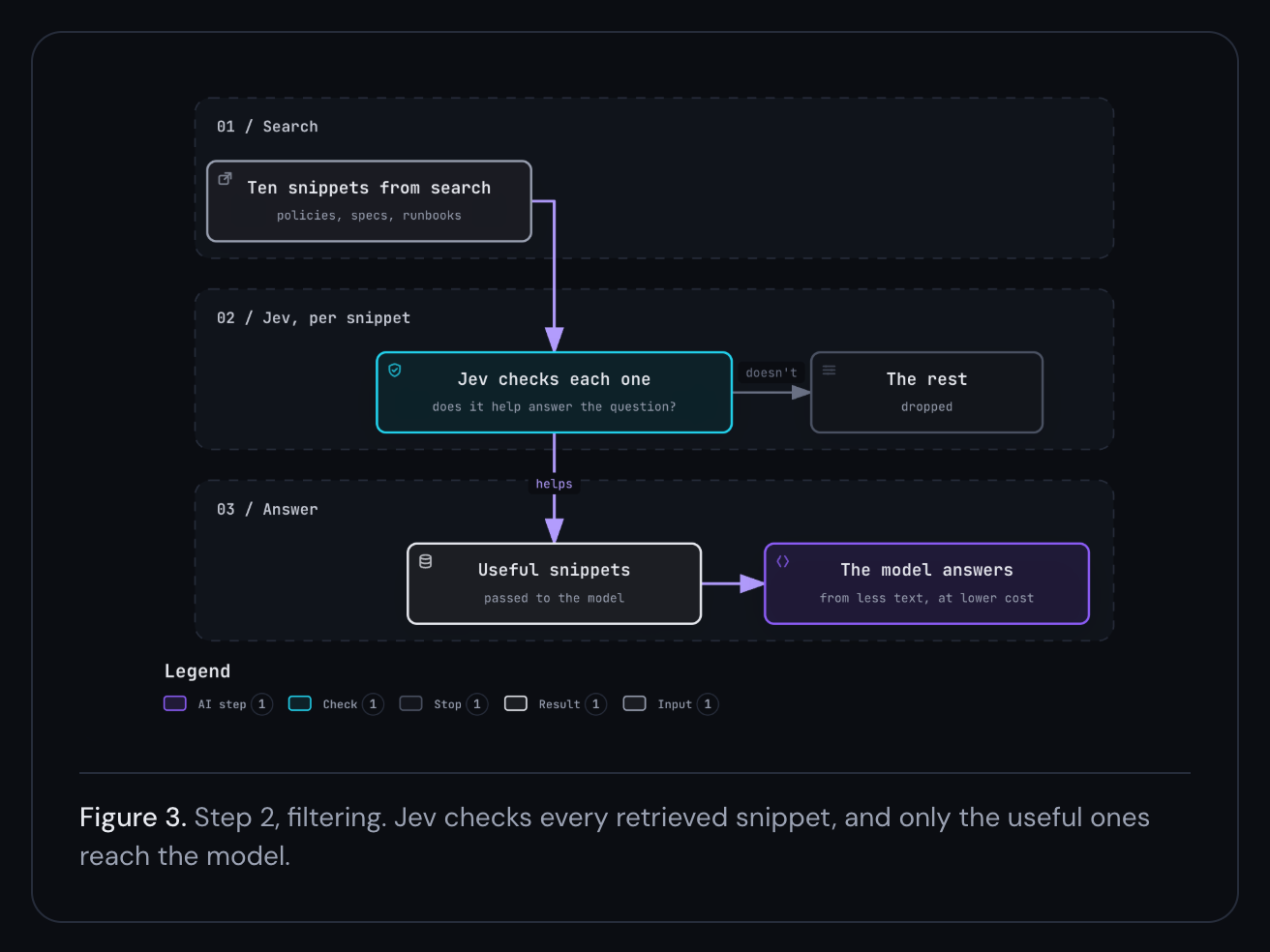
Scroll sideways to see the whole diagram.
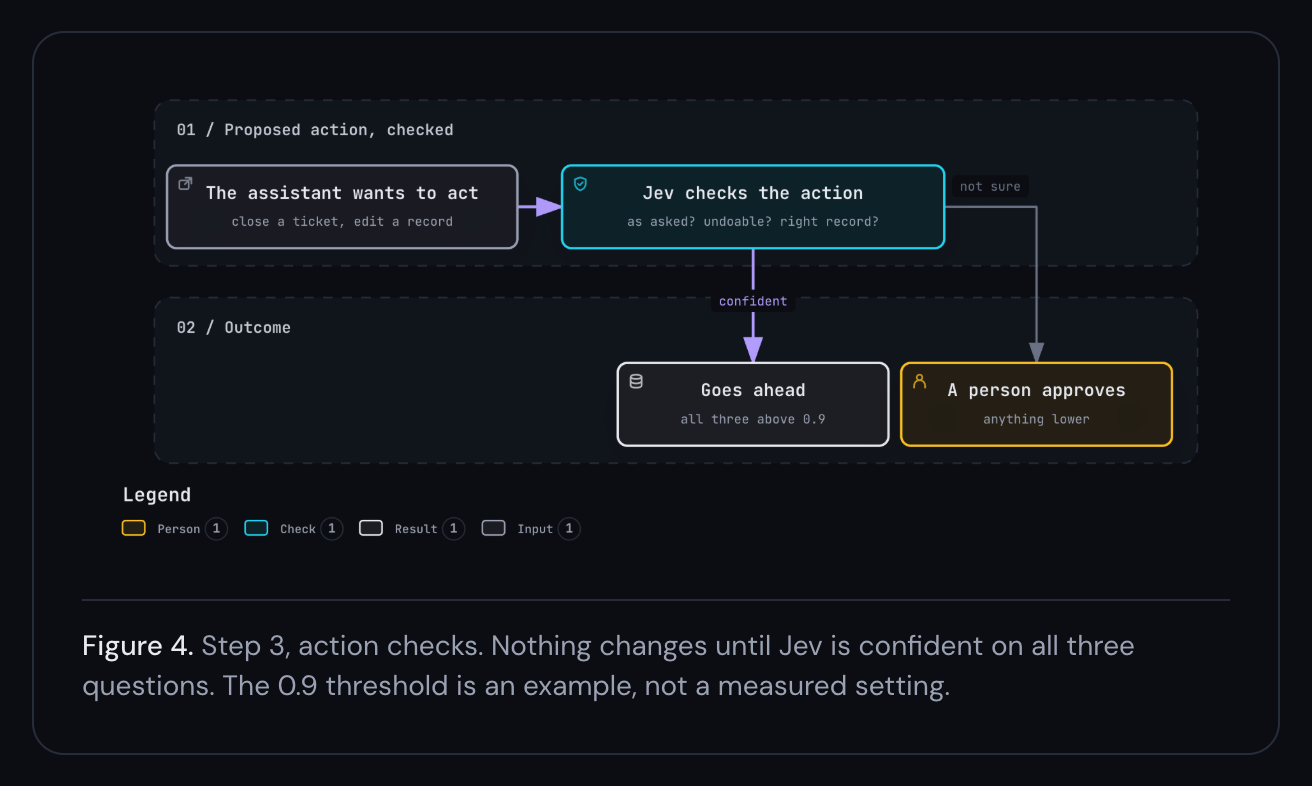
3. At the end: checking actions. Sometimes the assistant wants to do something instead of saying something: close a ticket, change a record. Before that runs, Jev checks it:
- Does it match what the person asked for?
- Can it be undone?
- Do the details look right? Right record, sensible values.
If all three come back above 0.9, it goes ahead. If not, a person approves it first. One caveat here. Jev's own docs say it's weaker against input written to trick it, so we treat this as a second line of defence. The first is still in code: what the assistant is allowed to touch at all.
Scroll sideways to see the whole diagram.
Proving it before switching. We'd pull a few hundred real questions from the assistant's logs and have the team mark what a good answer looks like. Then we'd run them through the old setup and the new one and compare. We agree the bar before we start: answers have to be at least as good as they are today. On routing, we'd look hardest at hard questions that ended up with the small model, because that's where things go wrong without anyone noticing. If the new setup holds up, it goes live and the old one stays on standby. If it doesn't, nothing changes, and now you know.
What it saves. Jev itself barely registers. At $0.042 per million input tokens, with output free, all three checks on 2,000 questions a day come to well under a dollar. The real saving is everything that stops running:
- If half the questions turn out to be easy, half the calls to the biggest model disappear.
- If filtering drops six of the ten snippets, the calls that still reach the big model have far less to read.
In a setup like this, most of the cost and compute is the big model writing answers. Run it less often, give it less to read, and you've made the biggest dent you can. You get the same answers, with the biggest model only doing the work that needs it. We haven't measured the energy difference, and we won't put a number on it until someone can.
Where it doesn't fit
Anything that needs a written answer, an explanation, or generated code is the wrong job for it. It returns a number, not a reason, so you can't ask it why. TypeSafe's own docs say it struggles with numbers, dates, and adversarial input. And if the right answer isn't among the options you gave it, it'll still confidently pick one. So it needs evals before it goes anywhere near production, like any other model. It's also new, and access and pricing may still change.
Where X-GenAI fits
When we scope a workflow, we now ask which steps are decisions rather than writing, and test a decision model like Jev on those against your real data. If your process is mostly sorting, checking and routing, we'd like to hear about it.
Sources
TypeSafe AI. System One concepts, Jev documentation (pricing, question types and stated limitations).
Luccioni, A. S., Jernite, Y. and Strubell, E. (2024). Power Hungry Processing: Watts Driving the Cost of AI Deployment? arXiv:2311.16863.
International Energy Agency (2025). Energy and AI. IEA, Paris.
Kahneman, D. (2011). Thinking, Fast and Slow.
Get new posts by email
AI updates, trend breakdowns, and picks for the certifications worth your time, a few times a month, when something's worth sending.
Have something like this to automate?